Basic Tutorial三部作
- Basic Training Air Operations, 1983
- Basic Training Submarine Operations, 2013 いまここ
- Basic Training Warship Operations, 2013
旧CMANO収録の潜水艦チュートリアル(Basic Tutorialのシナリオファイルダウンロードはここから).
米ヴァージニア級潜水艦を操作して基本的な潜水艦の運用方法を学ぶのが趣旨だが…
初見殺し確実なウダロイ型のおかげでBasic Tutorial中では断トツの難易度.
かきかけ
目次
全体図
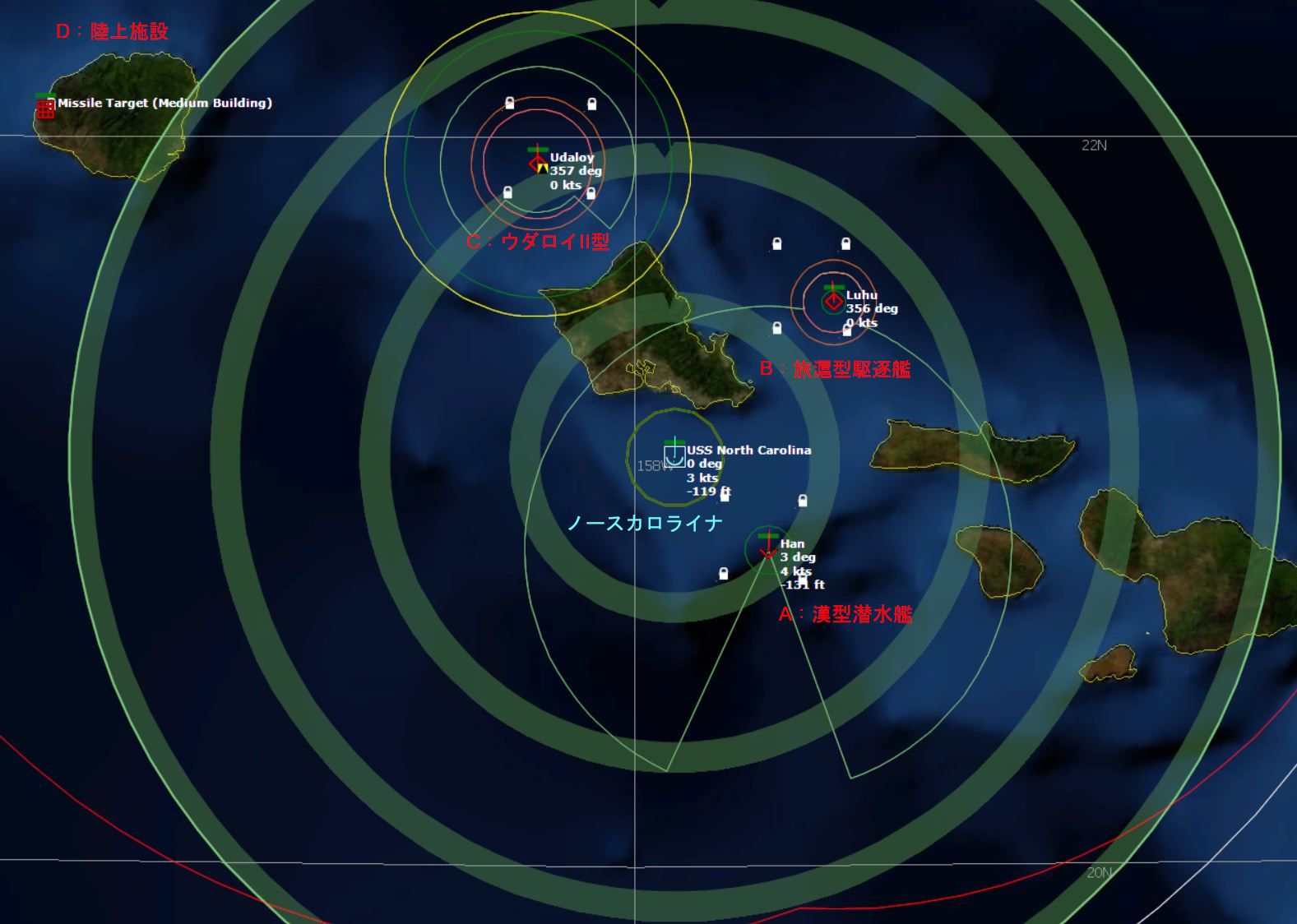
自艦:米ヴァージニア級潜水艦ノースカロライナ
シナリオが製作された2013年当時,そして2023年現在でも間違いなく世界最高の性能を持つ潜水艦の一つ.静粛性能(もっとも最新のディーゼル潜には及ばない)・ソーナー性能・搭載兵装どれをとっても文句なし.
ただしプレイヤーの操作がへたくそだとウダロイには勝てない.ノースカロライナの艦番号(ハルナンバー)はSSN-777で"The Lucky Girl"という通称もあるそうだが...
主兵装:
- Mk48ADCAP魚雷*12
- UGM-109C対地トマホーク (TLAM)*12(VLS発射型と魚雷発射管発射型が6発ずつ)
- UGM-109E戦術型トマホーク (TACTOM)*12(VLS発射型と魚雷発射管発射型が6発ずつ)
敵軍:
オアフ島を囲むように設定されたエリアA(右下)に091漢(ハン)型潜水艦,
エリアB(右上)に052旅滬(ルフ)型駆逐艦,エリアC(左上)にウダロイII型駆逐艦(Ka-27PL対潜ヘリ*2搭載),
左端の島(カウアイ島)にミサイル目標がいる.
初期設定
エリアAの4つあるRPを選択し制海哨戒ミッションを作成して,ノースカロライナを編入する.
フェイズが進むにつれミッションエリアをエリアB,エリアCと適宜変更していくか,あるいはそれぞれのエリアごとにミッションを作成.
ミッション設定
上記制海哨戒ミッションについてミッションエディターで以下の項目を設定する.
- Submarine Speed and Depth
Transit throttle, Station throttle, Attack throttleの項目をすべて"Creep"に設定する.この設定により,ノースカロライナはプレイヤーがわざと手動設定しない限り微速(5kt)以上の速力を出さない.
設定を行わないとプレイヤーが気付かないうちに潜水艦が全速で走っていて,敵艦のパッシブソーナーに発見されるという事態がしばしば発生する.ウダロイの目前でそんなことやったら死亡確定.
ドクトリン設定
陣営ドクトリンを以下のように変更する.
| ドクトリン項目名 | 設定するパラメーター |
| Weapon Control Status (WCS), surface | HOLD |
| Weapon Control Status (WCS), ASW | HOLD |
| Ignore plotted coruse when attacking | NO |

WCSをHOLDにするとターゲットが射程内に入っても自動攻撃を行わず,すべての攻撃はプレイヤーの手動操作を通じて行われる.これは面倒ではあるもののプレイヤー任意のタイミングで攻撃を行えることを意味し,とくにウダロイへの攻撃時はこの設定が絶対不可欠である.
Ignore plotted coruse when attacking(攻撃中プロットコース無視)をYESにしておくとターゲット発見時,プロットコースを無視して自動でターゲットに向かい移動・攻撃を行う.しかしこれでは戦闘中に潜水艦への細かい移動指示が出せない.NOにするとユニットはつねに設定されたプロットコースに向かって移動する.
設定終了したら画面下側の"Reset affected units"ボタンと"Reset affected missions"を押して設定ドクトリンをユニット・ミッションに適用させる.
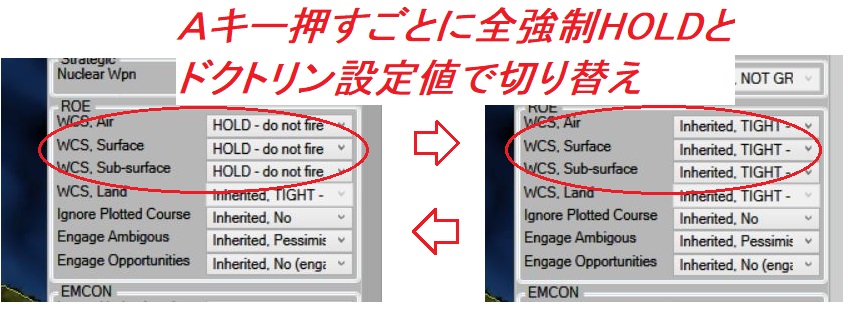
あるいはここでドクトリンをHOLD設定する代わりに,ノースカロライナを選択してAキーを押すごとにユニットのWCSが全強制HOLD・ドクトリン設定値で切り替わる(画面右側のユニットドクトリンタブを確認).あらかじめ全強制HOLDにしておいて攻撃するタイミングでAキーを押すと自動攻撃を行ってくれる(攻撃完了したら再度Aキーで全強制HOLDにもどす).
Phase I:091漢(ハン)型潜水艦
超楽勝.ただし北西方向から直接エリアAに侵入すると浅深度により曳航ソーナーが使えないので,回り道をして真西か南西方向からに侵入するように.射程内に入ったら魚雷発射.漢型は魚雷を発見すると回避運動に入るが,大した問題もなく命中する.
メッセージテキスト
Phase I: Sub vs. Sub
Proceed to Exercise Area A (marked by reference points A1-A4) where a simulated Chinese Han class submarine is currently patrolling. Detect and destroy this vessel. When complete proceed at best speed to Exercise Area B. Please slow down before entering area to preserve stealth characteristics.
Tips:
1. You may choose to create an ASW patrol mission in the Mission Editor to accomplish this task.
To do so:
The ASW patrol mission uses reference points to define the area to be patrolled. You will need to deselect the existing reference points and select the area A reference points to be used or define your own area by using the define area function.
You can deselect all reference points by left click drag selecting a box over all reference points (including the Barking Sands Range marker). You'll know they're unselected when they appear to be gray x's.
You should then define the area you want to patrol by left click drag selecting reference points A1-A4 to activate them. You'll know they are selected when they appear as gold diamonds and you see their names in bold white.
You could create your own box by pressing the control key while right clicking the mouse. When the drop down appears select Define Area and left click drag select the area you would like to create a zone which creates four selected reference points.
Next select Add New Mission from the Missions + Ref. Points drop down menu at the top of the UI.
When the New Mission dialog appears give the mission a name, select class (Patrol), Select Type (ASW Patrol) and then click the okay button.
When the Mission Editor Dialog appears select the mission to edit by selecting your mission name from mission list on the left. You'll know it is selected when the text is highlighted.
Select the checkbox next to USS North Carolina from the Unit Unassigned list on the far right and then click the left arrow button moving it into the units assigned to mission column. Your unit is now assigned to the ASW mission you created.
Click close to complete process of assigning North Carolina to a ASW Patrol Mission.
2. The UI does provide some helpful clues about the environment your submarine is operating in. Your mouse data block displays depth, thermocline (layer) depths and convergence zone range information. You can move the mouse data block to the bottom of your screen by going to Game, then Options, select the Map Display tab, and change the Map Cursor Databox Visibility.
3. Review the sensor dialog to learn about the type of sensors you submarine carries and how to best use them. The green rings or arcs show the range of your sonar sensors. The larger translucent rings show convergence zones.
4. The faster your submarine is traveling the easier it is for an enemy's passive sonar sensors to detect it and the harder it is for your submarine's sensor to detect an enemy submarine.
5. The thermocline is a great thing to have between you and a sensor that might be hunting you.
6. Submarines are assumed to trail their towed array at the same depth as themselves except when they are close to the layer or just inside it. At those locations they will trail their arrays just in or just out of the layer to minimize their counter detection range.
Phase II:052旅滬(ルフ)型駆逐艦
漢型を撃沈したらエリアBにウェイポイントを取り,10ktくらいで移動.エリアBの周辺20nmに来たら5ktsに減速.
旅滬型はソーナー範囲が小さい分漢型よりもっと楽勝,哨戒ミッションのコンピューター任せで勝てる.
メッセージテキスト
Phase II: Sub vs. Surface Warship
Exercise Area B (marked by reference points B1-B4) is currently being patrolled by a Chinese Luhu class destroyer. Hunt down and kill this ship. When completed proceed at best speed West to Exercise Area C. Please slow down before entering area to preserve stealth characteristics.
Tips:
1. You may choose to create an ASuW Patrol (Naval) mission in the Mission Editor to accomplish this task.
To do so:
The ASuW patrol (naval) mission uses reference points to define the area to be patrolled.
Deselect all previous reference points. You'll know they're deselected when they appear to be dull gray x's.
You should then define the area you want to patrol by left click drag selecting reference points B1-B4 to activate them. You'll know they are selected when you see their names in bold white.
You could create your own box by pressing control + right clicking, select Define Area and left click drag selecting the area you would like which creates four reference points.
Next select add new mission from missions drop down menu at the top of the UI.
When the New Mission dialog appears give the mission a name, select class (Patrol), Select Type (ASuW Patrol (Naval)) and then click the okay button.
If you assigned the sub to a previous mission you'll first need to unassign it from the previous mission and then assign it to the mission you just created.
To unassign a unit from a mission:
· Open the Mission Editor by selecting Missions + Ref. Points and then Mission Editor. Select the old mission name from the mission column on the left. You will now see the unit in the assigned to a mission slot in the center.
· Tick off the check box to select the unit and then click the right arrow button to move it to the unassigned slot on the right side of the mission editor dialog.
To assign the vessel to your new ASuW mission:
· Select the mission name from the left mission name slot. Tick off the check box next to USS North Carolina in the unassigned column on your right.
· Click the left arrow to move it into the assigned column in the center of the mission editor dialog.
The USS North Carolina is now assigned to your new mission.
2. You will likely detect the Luhu because it is using active sonar. Active sonar is highly effective for detecting submarines and surface ships at shorter ranges however it is very counter-detectable and can give your position away when used.
Phase III:ウダロイII型駆逐艦
旅滬型を撃沈した直後か,エリアCの手前でセーブ.一度このまま進めてあえてウダロイに撃沈されるプレイを推奨.
正直言って漢型と旅滬型はチュートリアルにしても簡単すぎる目標,ゴミであった.しかし旅滬型を撃沈した後でシナリオは急速に難しくなり始める.どうやっても潜水艦がウダロイの攻撃から生き残れない!!
魚雷落ちたウダロイ死ね!!
セーブしたらエリアA-B間の移動と同じようにして10ktでウダロイのいるエリアCに向かう.エリアC手前で5ktに減速.ウダロイを発見したら何も考えずに魚雷発射.
といってもウダロイを発見して攻撃を行うのはさほど難しくない.しかし(しかし!)ノースカロライナが魚雷を発射した後,突然恐ろしいアラーム音とともに"NEW CONTACT! Designated TORPEDO #5"「新コンタクト!魚雷#5を発見しました」というメッセージが表示される.
この時潜水艦の付近には魚雷が投下されていて,これを回避することはほとんど不可能でありプレイヤーは否応なく次のメッセージを見る羽目になる:
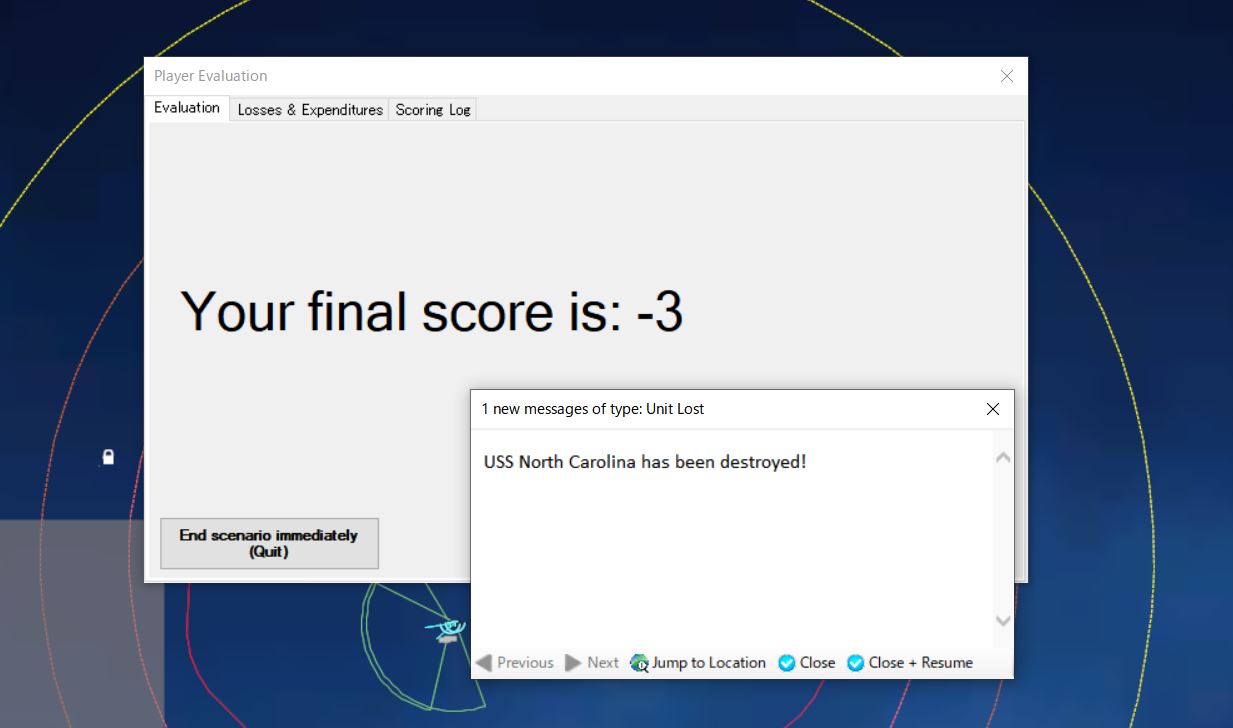
- "USS North Carolina is destroyed!"
- "The scenario has concluded. You will now be presented with the evaluation of your performance"
- "Your final score is: -3"

動画編
そしてこの事態は,なぜかいつもウダロイを攻撃した後になってはじめて発生する.いったい何が起こっているのだろうか?
なぜはウダロイはノースカロライナを殺すのか(解説篇)
戦術について議論する前に、なぜあなたの潜水艦がいつもウダロイ (または場合によってはヘリコプター) によって殺されるのかを知っておくことは良いことです。 このため、私はノースカロライナの哨戒任務 (制海) を設定して彼女を割り当て、その後レッドにサイドを切り替えて「プレイヤーの典型的なミス」を観察しました。
ノースカロライナの魚雷発射まで
ノースカロライナは、洗練されたソナーを備えており、最初にウダロイを検出し、Mk 48 ADCAP 魚雷を発射する位置を修正することに問題はありません。 興味深い事実は、ノースカロライナ州が低速を維持し、ウダロイとの距離 (約 10 ~ 15nm) を維持している限り、ウダロイはパッシブソナーで NC をほとんど検出しないということです。 これまでのところ、ノースカロライナ州ではすべてが順調に進んでいるように見えます。
画像 3&4: ノースカロライナ州が魚雷を発射する直前の状況。 ウダロイ(チャバネンコ提督)は約13nmの範囲で潜水艦を検出しませんでしたが、NCはウダロイを検出しました。 画像4はビューの神モードです。
ノースカロライナ州は魚雷を発射し、その後突然ノースカロライナ州が殺されました。 何が起こっていますか? ウダロイの動きをもう少し見てみましょう。
ウダロイの回避開始~アクティブソーナー探知→対潜ミサイル攻撃

ウダロイは 5 ノットでゆっくりと走行しており、魚雷がパッシブ ソナー検出範囲に入るとすぐに、飛来する魚雷 (65 ノットで走行しているため非常にうるさい) を検知します。 次に、Udaloy はすべてのセンサーをオンにし (ドクトリンが「攻撃中の EMCON を無視する」を「Yes」に設定しているため)、回避行動を開始します。 また、魚雷の飛来が検知されると、ポサブコンタクトが自動的に生成されることにも注意してください。 しかし、不確実な領域が広すぎるため、今のところウダロイはノースカロライナ州がどこにあるのか知りません(ウダロイは敵の潜水艦がこの近くに潜んでいることだけを知っています)。
さて、アクティブソナーを鳴らし、側面に向けて速度を上げる前にまだ5~10ノットで走行しているウダロイが、アクティブソナーによって突然潜水艦との接触を検出しました。 2 つまたは 3 つのアクティブな探知は、ロシアの致命的な長槍を発射するのに十分な精度です。 RPK-6 Vodopad/SS-N-15 スターフィッシュ対潜ミサイル。 対潜水艦ミサイルの(潜水艦にとって)厄介な点の 1 つは、潜水艦のすぐ隣に魚雷の接触が現れるまで、潜水艦はその発射を知ることができないことです。 特にRPK-6の射程は22nm(SUBROCの射程は「短すぎる」8nm)で、ソナー範囲(直接通過検出の場合は10~15nm)をカバーします。 たとえRPK-6が失敗したとしても、2機のヘリコプター(1機は哨戒中、もう1機は攻撃任務を割り当てられている)が任務を完了するだろう(画像4)。
画像5: ウダロイが魚雷の飛来を検知し、ポサブ接触(GOBLIN #3)が発生。 AOU が大きいことに注意してください。
画像 6: 画像 5 から約 20 秒。ウダロイはアクティブ ソナーをオンにし、GOBLIN #3 (=ノースカロライナ) を正確に特定しました。
画像 7: ミサイルとヘリコプターが離れています。
課題
つまり、「魚雷探知 - 回避行動 - アクティブソナーオン - 潜水艦探知 - 攻撃」という流れになります。 これを避けるには;
1) 完全に防止できない場合でも、魚雷の探知をできるだけ遅らせます。
2) アクティブソナーサーチで検出されないこと
どちらも検出に関連していることがわかります。 そう、潜水艦戦の 3/4 は探知の問題なのです! そしてそこには多くの要因が関係します。
自艦を発見されにくくする
ここでは、Udaloy がどのようなソナーを備えているのか、またそのパフォーマンスがいくつかの要因によってどのように変化するのかを見ていきます。
Udaloy (正確には Udaloy II、Udaloy I は少し異なるソナー セットを持っています) には次のソナーがあります。
オックスヨーク [MGK-365 Zvezda-2] : 16nm、ハルソナーアクティブ/パッシブ、MF
オックステール [MGK-365 Zvezda-2] (1): 8nm、TASS パッシブ、MF
オックステール [MGK-365 Zvezda-2] (2): 8nm、VDS アクティブ、MF
ようやくわかったウダロイ必勝法
- ウダロイが真後ろをさらすのを待って魚雷発射(一番安全).それがだめなら:
- 浅深度でウダロイを発見・距離10nm程度に来るまで待つ
- 水温躍層内・層下に移動して魚雷発射
- 発射後そのままの深度しばらく待つ
- 魚雷がウダロイ(の最終探知位置)に近づいたら水温躍層上に移動して魚雷を誘導する
- ウダロイから8nm以内には絶対入るな
- エリアC内には入るな
Udaloy の最大射程 TASS/VDS が 8nm に制限されていることは非常に良いニュースです。これは、Udaloy には画像に示すバッフルがあることを意味します。
メッセージテキスト
Phase III: Sub vs. Surface Warship and ASW Helicopter.
Exercise Area C (marked by reference point C1-C4) is currently being patrolled by a Russian Udaloy class anti-submarine destroyer with Ka-27 Helix ASW helicopters embarked. Hunt down and kill this target.
Tips:
1. You may choose to create an ASuW Patrol (Naval) mission in the Mission Editor to accomplish this task. Please follow the same procedures you have used in the last two exercises to do so.
2. ASW aircraft in the game can be employed in a couple of ways to counter submarines.
The helicopter could be assigned to an ASW strike mission which triggers when an enemy sensor detects the submarine. The helicopter will take off and employ it on board sensors and sonobouys to localize the target and then attack using torpedoes or depth charges.
The helicopter could be assigned to an ASW patrol mission at which the helicopter will launch and patrol a designated area using its onboard sensors and sonobouys. When a submarine is detected and localized the helicopter will attack.
3. It is assumed that towed arrays and VDS pods streamed from surface ships always hang just below the layer to benefit from the deep sound channel. Over the layer detections are usually handled by a hull mounted set on the same ship.
Phase IV:地上施設
ウダロイとの死闘の後となってはどうしようもなく簡単.ゴミ.蛇足.ただし考慮すべきことは:
- 潜水艦発射ミサイルは-165ft/50m以深では発射できない.もし潜水艦がこれより深い深度にいる場合はいったん浅深度まで浮上する必要がある.
- 本シナリオのヴァージニアの場合「VLSに搭載してあるトマホーク」と「魚雷発射管に装填するトマホーク」が二種類存在し,性能は全く一緒だがDBビューアを見るとそれぞれ「VLS」「TT」の注記がある.万が一魚雷発射管用のトマホークを発射したい場合,発射管の搭載兵装を交換する必要がある.
- トマホークにはさらにUGM-109C(ブロックIII型)とUGM-109E(TACTOM-戦術型トマホークと通称されるブロックIV型)の二種類に分けることができ,109E型のほうが高性能(IRシーカー搭載により移動目標を狙える).もっとも今回の標的はは固定目標だし違いを気にしなくてよい.
メッセージテキスト
Phase IV: Sub vs. Land Target
Destroy the medium building target on Barking Sands Missile Range with one or two Tomahawk cruise missiles.
Tips:
1. You can assign your submarine to Strike (Land) mission using the same procedure as mentioned in previous phases.
2. If you would like to manually launch the Tomahawk missiles be sure to check the launch parameters of your missiles. Typically you will have to come to shallow depth or surface to fire. In this case it will be shallow depth.
外部リンク
どのプレイ動画でもさも簡単そうにウダロイを撃沈しているが,これは誤解を招く.
Matrix Gamesフォーラムのスレッド
- Welp, that was easy...
"that was easy"
- Basic training after action report
"This one was a lot easier"?おまえはなにをいっているんだ(2013年9月,CMANO販売直後の投稿なので現在ほど難しくなかった可能性もある)
- Submarine logic - Matrix Games Forums
「船とヘリのコンボである「Ka-27 Helix ASW ヘリコプターを搭載したロシアのウダロイ級対潜駆逐艦」を撃破しようとするまでは、物事はうまくいきます」
- Tutorial 2 - Basic Training: Submarine Operations(ウダロイの探知をかわす詳細な議論)
Steamガイド
- https://steamcommunity.com/sharedfiles/filedetails/?id=1159557825
このガイドには例の「潜水艦ノースカロライナ撃沈!」「シナリオは終了しました」のスクリーンショットがある!
Youtubeプレイ動画
- COMMAND Episode 1 Part 2 Submarine Tutorial - Command: Modern Air/Naval Operations
ウダロイ戦55:35から,1:01:36で対潜ミサイルを撃たれている(ただし効果音なし)
- CMANO Tutorials Episode 3(ウダロイ戦1:04:30から)
- [Fr] Command Modern Air Naval Opérations / Basic Training: Submarine Operations #3(フランス語)
ウダロイ戦14:11から,投稿者はWCSをHOLDにしつつウダロイが後方を見せるのを待ってから手動で魚雷発射している.上手い.魚雷の速力・針路を調整している点も見逃せない.
- {06} Command: Modern Air/Naval Operations – Tutorial – Parte #03-02 – [PT BR](ポルトガル語)
ウダロイ戦14:28から